Why QuikQ Is the Easiest Way to Create Online Tests and Quizzes
Most test tools make you build the test, police the test, and grade the test. QuikQ does the last two for you. Here is how it works and why it saves hours every week.
Why QuikQ Is the Easiest Way to Create Online Tests and Quizzes
Every teacher, recruiter, and trainer we talked to before building QuikQ described the same Sunday night: a stack of submissions, a spreadsheet, and two hours of grading that a computer should have done. The test took 20 minutes to write. Everything around it ate the weekend.
That gap is exactly what QuikQ closes. It is a free online test maker that handles the boring parts of assessment, the timing, the proctoring, the grading, the results, so the only thing you spend real effort on is writing good questions.
This post walks through how QuikQ works, when to reach for a test versus a quiz, and how to go from a blank page to a shareable link in about five minutes.
The problem with most online test tools
Most tools in this space fall into one of two traps.
The first group is too heavy. Enterprise assessment platforms bury you in question banks, certification workflows, and admin panels with forty settings you will never touch. By the time you have configured everything, you could have written the test twice.
The second group is too light. Generic form builders will happily collect answers, but then the real work starts. You export a CSV, match answers against a key, chase down the person who submitted twice, and wonder whether anyone had three other tabs open with the answers.
Either way, you end up doing three jobs: building the test, policing the test, and grading the test. Only the first one deserves your time.
What QuikQ does differently
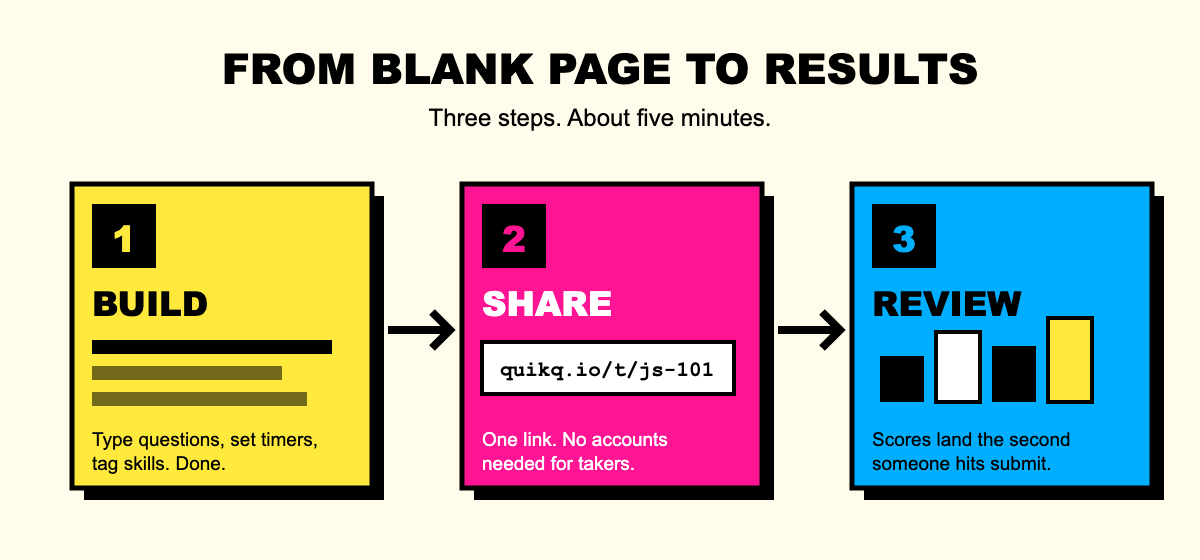
QuikQ strips test creation down to one loop: build, share, review. Everything else runs on its own.
Timed sections that run themselves
Set a timer for the whole test or for individual sections. When time runs out, QuikQ moves the taker forward automatically. Nobody watches a clock, and nobody gets an extra ten minutes because they claimed the page froze.
Anti-cheat that works quietly in the background
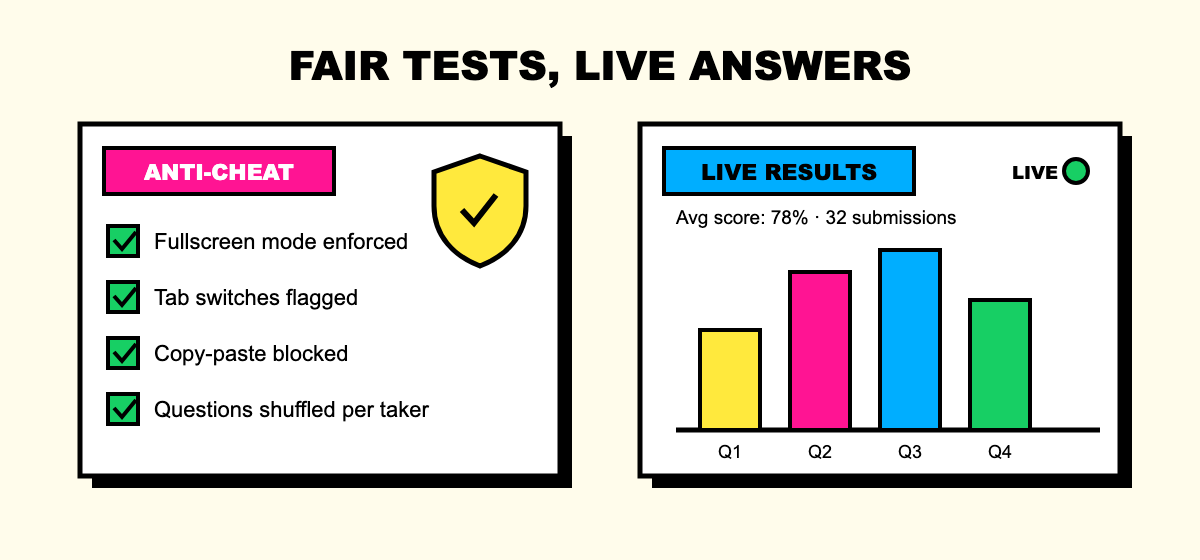
This is where QuikQ pulls ahead of form builders. You can enforce fullscreen mode, detect tab switches, block copy-paste, and shuffle question order so no two takers see the same sequence. Violations are logged against each submission, so you see exactly what happened and decide how much it matters. A flagged tab switch on question 3 tells a very different story than a clean run.
Auto-grading, so scores exist the moment someone submits
Multiple choice, true or false, and short answers are scored instantly against your answer key. No exports, no marking sessions. The Sunday night spreadsheet simply stops existing.
Skill tagging that turns scores into insight
Tag each question with the skill it measures, like "JavaScript basics" or "customer empathy". Instead of a flat 72%, you learn that a candidate is strong on fundamentals but shaky on debugging. That is the difference between a score and a decision.
One link, live results
Publishing gives you a single share link. Takers do not need accounts, downloads, or invites. As submissions come in, your dashboard updates in real time: average scores, per-question breakdowns, completion rates, and which questions everyone is getting wrong. If question 4 has a 20% success rate, either it is your hardest question or it is badly worded. Now you know to look.
Test or quiz? When to use each
People use the words interchangeably, but they solve different problems, and QuikQ is built for both.
Use a test when the outcome matters. Screening candidates, certifying a training module, running a graded exam. Tests want timers, anti-cheat, and skill tagging turned on, because you will act on the results.
Use a quiz when engagement matters. Checking understanding after a lesson, warming up a workshop, running a Friday trivia round. Quizzes want speed and fun: quick setup, instant scores, zero friction for takers.
The practical difference is a handful of toggles, not a different product. Start strict and loosen up, or start playful and tighten the screws later.
Create your first test in five minutes
Here is the actual workflow, timed generously.
Sign up free at quikq.io. No credit card, no sales call.
Add your questions. Type them in, mark the correct answers, and set point values. Tag skills if you want richer analytics.
Set the rules. Add a timer, turn on the anti-cheat features you need, and decide whether takers see their scores immediately.
Publish and copy your link. Drop it in an email, a Slack channel, or a classroom portal.
Watch results arrive. Scores, skill breakdowns, and flags appear live on your dashboard.
The first test takes five minutes because you are learning the builder. The second one takes three.
Who gets the most out of QuikQ
Teachers run weekly checks and end-of-unit tests without spending evenings grading, and the per-question analytics show exactly which concept the class missed.
Recruiters and hiring managers screen dozens of candidates with one link, trust the results because anti-cheat was on, and compare people by skill instead of by gut feeling.
Trainers and team leads verify that the compliance module actually landed, with a timestamped, auto-graded record to prove it.
If your current process involves a form builder plus a spreadsheet plus manual grading, QuikQ replaces all three.
Frequently asked questions
Is QuikQ really free?
Yes. You can build tests and quizzes, share them, and review results without paying or entering a card.
Do test takers need an account?
No. They open your link and start. Removing that step is one of the biggest boosts to completion rates.
How does QuikQ prevent cheating on online tests?
Fullscreen enforcement, tab-switch detection, copy-paste blocking, and per-taker question shuffling. Every violation is logged on the submission so you have full context, not just a score.
Can I see results while the test is still open?
Yes. The dashboard updates live with every submission, so you can spot problems while there is still time to fix them.
Write the questions. Skip the busywork.
Good assessment is about asking the right questions and acting on the answers. Everything in between, the timing, the proctoring, the grading, the charts, is machinery. QuikQ builds the machinery so you do not have to.